
PlayDash MY Account Access Guide
Returning players start at PlayDash MY and open the Log in form. Our page explains how to enter, what you can open after login and how to solve the most common access problems.
Ways to Log In to PlayDash MY
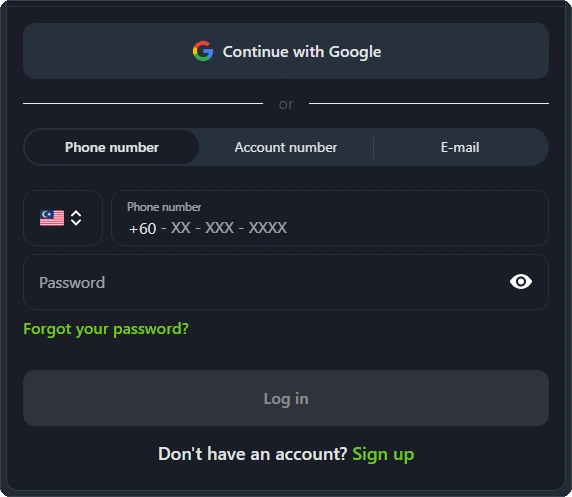
The login form of PlayDash MY has three tabs: Phone number, Account number and E-mail. Choose the tab that fits the way you signed up:
- Open the Log in form on PlayDash MY, the same page people search as playdash login.
- Open the Phone number, Account number or E-mail tab.
- Enter that contact or number and your password.
- Confirm the form to enter your account.
Forgotten Password at PlayDash MY
The login form has a Forgot your password? link. Use it when you cannot remember the password. If it does not help, open live chat or write to [email protected]. Our team will help you with access. Never send the password itself in a message.
What Opens After You Log In
Several areas need an account. The table shows what a logged-in player can reach.
| Area | What you find there |
|---|---|
| Cashier | Deposits and withdrawals; a guest is sent to the login page |
| VIP lobby | Details of the VIP programme |
| Bonus History | The list of offers you already claimed |
| Bonus Shop | The shop that works with PD Coins |
The VIP lobby of PlayDash MY asks guests to log in first. VIP conditions are shown after login.
If You Cannot Log In to PlayDash MY
Check the Basics
Most failures come from small slips. Look at the keyboard layout, the caps lock key and a space at the end of the password. If you used a phone number, make sure it starts with +60 for a Malaysian line.
Contact Support
When the details are correct and the form still refuses, open the live chat of PlayDash MY. Describe the error text to our team. You can also write to [email protected]. Do not send your password in any message, because the team never needs it.
Account Under Review
The company can restrict service or payouts until verification is complete. Remember that missing files for 30 days can lead to cancelled winnings. Ask our support team in live chat if you have a question about documents.
Keep Your PlayDash MY Account Safe
- Use a password that you do not use on other sites.
- Log out on shared devices, and close the tab after play.
- Open the site only from our official address, and check the lock sign in the browser.
- Never share a verification file with a person who writes to you first.
Treat messages with care when they ask for a payment outside the cashier. If something looks wrong, stop and ask in live chat.
If you suspect that someone else knows your password, change it and tell support. Fast action limits the damage when someone else gets your details.
PlayDash MY Login on a Phone
A PlayDash casino login works the same way in a mobile browser. The menu opens from a burger button, and odds format and language options live in the same menu. Lock the phone when you are done, so that nobody else can use your open session. If the page looks cut off, reload it and clear the site data in the browser settings. Avoid public wireless networks for payments, and keep the browser up to date. A screen lock on the phone adds one more layer of protection for your account and your documents.
PlayDash MY Login FAQ
Which login tab should I use at PlayDash MY?
Use the tab that matches your sign-up: Phone number, Account number or E-mail. Each tab sits at the top of the form.
How do I open the PlayDash MY login form?
Open the Log in form and choose the Phone number, Account number or E-mail tab. The mobile menu also holds the odds format and language options.
What if I forget my PlayDash MY password?
Use the Forgot your password? link in the login form. If it does not help, contact live chat or e-mail [email protected]. Never send the password itself.
Where can I see past bonuses at PlayDash MY?
Bonus History is part of the account area after login, next to the Bonus Shop and PD Coins.
Is a login needed to open the PlayDash MY cashier?
Yes. A guest who opens the deposit page is sent to the login page, so we quote no method limits here.