
PlayDash MY Promo Codes Explained
A promo code is a short text that unlocks an offer. At PlayDash MY, you can enter it in two places, and each place serves a different moment. Our page covers the fields, the rules behind a code and a few safe habits.
Where Do You Enter a PlayDash MY Promo Code?
In the Sign-Up Form
The registration form has a line called I Have a Promo Code. Press it to open the field. Type the code before you send the form. Our own PlayDash promo code field sits under that line.
In the Account Area
Promo codes are also listed among the account tools, next to the Bonus Shop, PD Coins and Bonus History. Details are visible after login, and a saved PlayDash code appears there too. Ask live chat if you cannot find the field.
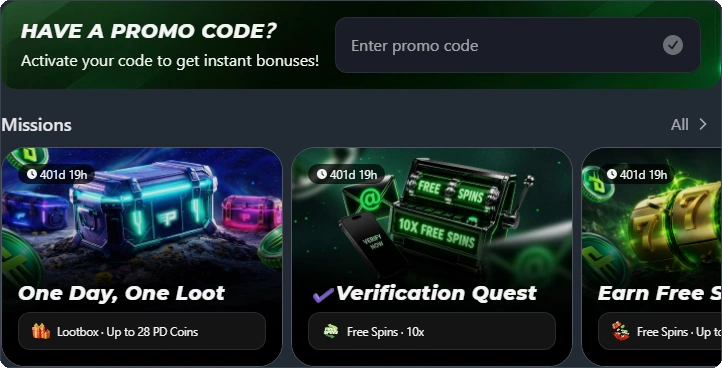
What a PlayDash MY Promo Code Can Do
A promo code is one more way to receive a bonus. The exact reward depends on the code, so we quote none here. Read the rules shown with a code before you use it.
The bonus policy is the baseline for any bonus. The usual limits are:
- A bonus needs a deposit of MYR 50 or more.
- Wagering must finish within 30 days.
- A bonus cannot be combined with another offer.
- The maximum withdrawal depends on the bonus.
Several campaigns carry rules of their own. One Day One Loot needs a deposit of MYR 50 and has zero turnover. Earn Free Spins Daily needs a single deposit of MYR 200. Weekend Slam needs MYR 50 and runs on Saturday. The referral bonus of MYR 50 needs 1x turnover. Read the page of each campaign before you rely on it at PlayDash MY. The Weekend Slam offers 58 free spins or a sport free bet of MYR 10 or MYR 20, so the reward differs between campaigns, and a promo code is only one of several ways to receive a bonus.
Code Versus Welcome Bonus at PlayDash MY
New players can choose a welcome offer and add a code in the same form. Because bonuses cannot be combined, ask live chat which offer applies before you deposit.
| Question | Answer |
|---|---|
| Is a code required to sign up? | No, it is a separate line in the form |
| Can a code be combined with another offer? | No, the bonus policy says a bonus cannot be combined |
| Where do I check past bonuses? | In Bonus History |
Safe Habits With Promo Codes
Take codes only from pages that belong to the brand. Our Telegram channel carries exclusive offers. Be careful with messages that promise a bonus in exchange for a deposit to a private account. PlayDash MY never needs your password for a code.
Copy the text exactly, with no extra space. If the field shows an error, try once more. Then contact our support team at [email protected] or in live chat.
When a Code Does Not Work
A typed space or a swapped letter can break the match. Copy the code again from the source, and check the date of the promotion. Because a bonus cannot be combined with another offer, an active bonus can also get in the way. Live chat can tell you what applies.
After You Activate a PlayDash MY Code
Open Bonus History to see the offer, and read the bonus policy for its wagering rule. Use only games marked for wagering, and watch the 30-day limit. Promotion dates change, so check the date. Gamble only with money that you can afford to lose.
PlayDash MY Promo Code FAQ
Can I enter a PlayDash MY promo code after I register?
Promo codes are listed among the account tools after login. If you cannot find the field, ask live chat.
Is the promo code field in the PlayDash MY sign-up form required?
No. It is the separate I Have a Promo Code line in the form.
Where do I find a PlayDash MY promo code?
Our Telegram channel carries exclusive offers, and the promo pages list current campaigns. Use only codes from official sources.
Can a promo code be stacked with a welcome bonus at PlayDash MY?
The bonus policy says offers cannot be combined, so expect one offer to apply.
Where can I ask about a PlayDash MY code that fails?
Use the live chat or write to [email protected] and include a screenshot of the message.